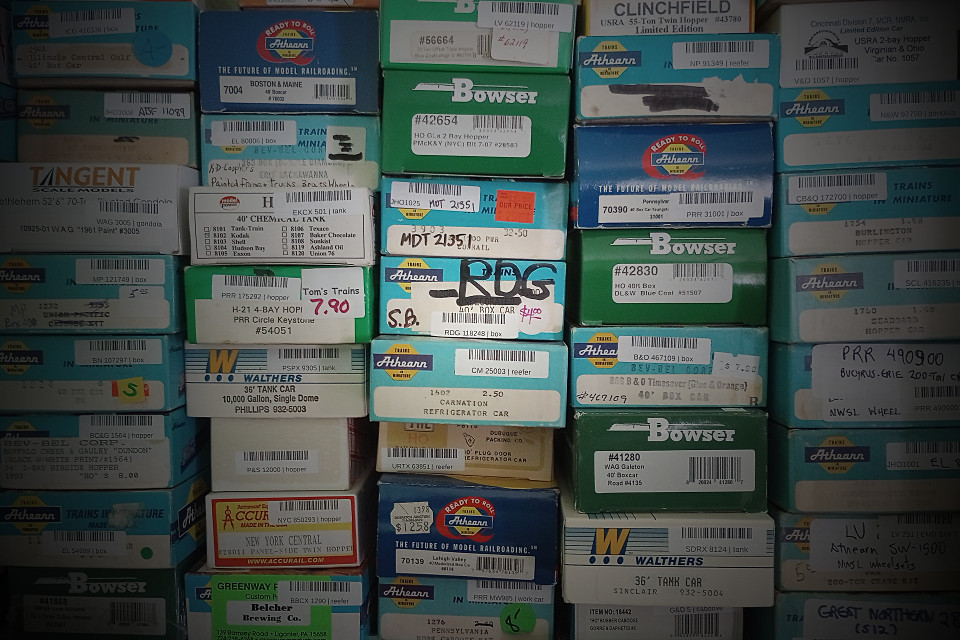
My wife thinks I have too many trains. I vehemently disagree with that assessment, but lately I’ve had some difficulty making an effective counter-argument. I’m not exactly sure how many I do have, and I need to do something about that. Should be a pretty straightforward task, right? We live in a world chock-full of databases and spreadsheets and hardware to run them on, and if all else fails, 3×5 index cards are still cheap and plentiful.
Inventory: a Brief History
Decades ago, one of the very first things I did upon gaining precious access to my high school’s lone TRS-80 Model III was write a crude database program in BASIC for my still-modest American Flyer collection. The Monday after a train-show haul, I’d bring my handwritten updates to school, enter them during lab time, and spit out a fresh inventory printout on striped pinfeed paper. Ahh, the early Eighties—what a time to be alive! Alas, when I graduated, I couldn’t take the TRS-80 with me, and I had to content myself with penciled updates on the last printout.
In later years, I re-did the American Flyer inventory on a bootleg copy of Microsoft Excel, running on my Mac Plus. When I mothballed that Mac in favor of newer machinery, the inventory once again lapsed into outdatedness. I didn’t have spreadsheet software again until I switched to Linux, years later.
When I got back into N scale twenty years ago, I initially kept track of it with index cards, and moved things into JMRI later. I was motivated more by the desire to set up some kind of car-forwarding scheme than for inventory-management purposes, but JMRI did the job pretty well. I did, however, leave a lot of my rolling stock out—things like “legacy” cars (usually sporting Rapido couplers) and DC-only locomotives, things with no role in my operation schemes, but still taking up hobby space. Over the years, this added up to a fair amount of undocumented rolling stock.
The same thing happened when I started gathering HO scale cars for the Windlenook project a few years ago. I dutifully entered my acquisitions into a LibreOffice Calc spreadsheet, but only those with a planned role on the layout. If a new car wasn’t 40 feet long and Kadee-equipped, it remained an off-roster item. The rolling-stock oddities were permitted to pile up as if they were no big deal, which they weren’t, until they were. Locomotives weren’t listed either, because there weren’t supposed to be more than two or three of them, ever. Yeah, right.
Where’d I Put That?
So, a half-century of enthusiastic acquisition has resulted in three separate but related train collections with the same problem: I haven’t kept track of what I have. To a large degree, this stems from simple laziness, but it’s also a factor of my particular hobby style: most of my operation happens at shows. Every so often, I pull a select number of items from various boxes and shelves, put them in a crate, and cart them off to a show. Things get shuffled around a lot in the process, and sometimes misplaced. I’ve never lost an item at a show or in transit, but returning (or newly-purchased) items don’t always get stored in places where I expect to find them later. Even more than I need to know what I have, I need to know where I last put it. My N scale show crate typically contains about 50 items at any given time, and gets reshuffled a few times a year. I’d like to make the updating process as painless as possible, and maybe rotate items more frequently. The last time I dug into the boxes downstairs, I found things I haven’t run in over a decade.
Inspiration struck one day in the form of a YouTube video about book collecting, of all things. (I have large piles of those, too, but that’s a story for another day.) The person was touting a library-management app, and using a barcode scanner to enter her book collection into it.
Wait. A barcode scanner? Are they expensive? Would that work?
I Googled some questions, clicked some links, and got some answers. No, scanners aren’t expensive, and yes, barcodes could be the silver bullet my collections need. The scanner featured in the video was USB-compatible, wireless, and less than $35 from Amazon. I promptly ordered one.
Is a barcode scanner necessary? Couldn’t you just use a smartphone for that? Yes, I suppose. I have a smartphone of my own now (I held out for as long as I could), and there’s a barcode scanning app on it, but the scanner is one-fifth the cost, faster, easier to hold, and works better in a dark basement. One prevented tumble of a phone to a rough concrete floor will pay for the scanner several times over. It also interfaces directly with a spreadsheet on my laptop via USB, which means I’m not tied to proprietary apps, either.
Coding the Boxes, Not the Trains
I love original boxes. My rolling stock gets handled a lot going to and from shows, and nothing beats factory packaging for keeping things safe in transit. If it came in a box, I keep the box, and when it comes off the layout, it goes back into the box.
This simplifies barcoding. There’s no place on an N scale car for a barcode sticker, and in most cases, it’s not really practical to put it on an HO scale car, either. There’s plenty of room on the box, though, and most of the major manufacturers have been putting UPC codes on their boxes for years now. (UPC is the type of barcode on your groceries and other retail purchases.) I found that over a third of my N scale was already coded. All I had to do was scan the codes into the spreadsheet.
There were a few instances where the barcode was faded, illegible, or duplicated on other items. For those items, I made new barcodes and put them right over the old codes. A properly-formatted spreadsheet, a barcode-encoding macro, a barcode font, and a package of labels was all that was required. Uncoded boxes—older items, special runs, items sold in shrink-wrapped runner packs—received fresh barcodes, usually encoded with the reporting marks of the car. I printed them, along with the reporting marks and car type in plain text, on 1/2 x 1-3/4 labels. Applying the labels to the long side of a typical N scale crystal box, the side facing the underside of the car, allows me to see the reporting marks as I’m reboxing cars at a show. Handy!
With my HO collection, there weren’t as many ready-to-use UPC codes on the boxes. Much of what I have is older items, made for a bygone retail environment dominated by mom-and-pop hobby shops. There’s plenty of room on the end of an Athearn blue box for a label, though, so it was little trouble to add codes there. This makes finding a particular car on a crowded shelf—or even re-scanning the entire shelf—very easy.
Ah, but where does that leave the unboxed items? Good question! A significant minority of my N and HO collections lack factory packaging. The N scale items have mostly accumulated into cardboard trays, which aren’t really meant for transport, and just kinda-okay for storage. Loose HO items tend to get wrapped in individual sheets of foam, then tucked into shallow boxes. That’s better than the N scale situation, but still far from ideal. None of this lends itself to easy barcoding.
I realized pretty early on that I wasn’t facing just an inventory problem, but also a storage and transport problem, too. Time to upgrade boxes and shelving.
 Furniture Railroads